Training 8 min read
Why Your Watch and Phone Show a Different Distance: GPS Explained
Your watch says 10.2 km, your phone says 9.9 km and the course was exactly 10. Here is where GPS distance differences come from and what you can do to get closer to the truth.
Published by BEON.RUN · · Updated
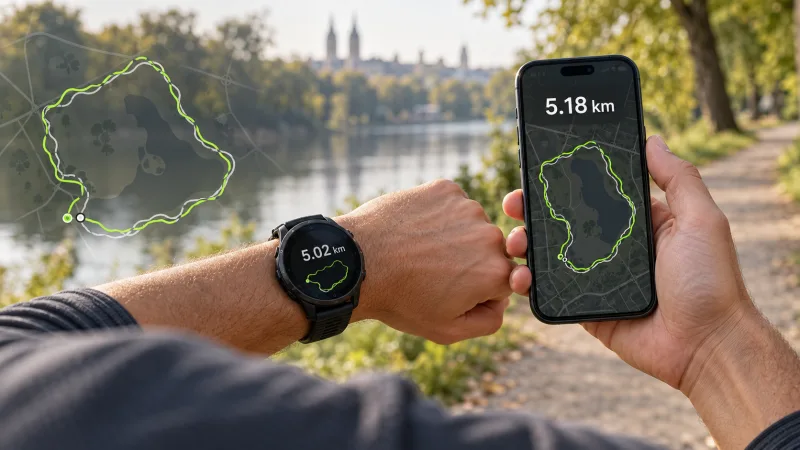
You and a friend run the same loop side by side. Your watch says 10.24 km, theirs says 9.91 km and your phone app shows something else again. At the end of a marathon you see 42.6 km and wonder whether the organizers measured the course wrong. Relax: in almost every case, everything is working exactly as designed.
This guide explains how GPS actually works when you run, where distance differences come from and why races always seem to come out a little long. At the end you get a table of typical situations and practical ways to measure more accurately.
How your phone and watch know where you are
GPS is just one of several global satellite navigation systems. The umbrella term is GNSS. Modern phones and watches usually listen to several systems at once:
- GPS (United States),
- Galileo (European Union),
- GLONASS (Russia),
- BeiDou (China).
Each satellite broadcasts a signal with a very precise timestamp. Your receiver measures how long the signal took to arrive and turns that into a distance to the satellite. With measurements from at least four satellites it can work out its position and the exact time. The more satellites it sees, and the better they are spread across the sky, the more reliable the fix.
The catch is that satellite signals are extremely weak. They are easy to block or bounce. Anything between you and the sky, such as buildings, tree cover, an overpass, even your own body and backpack, makes the measurement worse.
Dual-frequency, also called multi-band
Newer watches and some phones have dual-frequency receivers (often marketed as dual-band or multi-band, for example L1 + L5). They receive two different signals from a satellite, which helps tell the direct signal from a reflected one and removes some errors. The biggest gain is in cities and dense terrain. The price is usually slightly higher battery use.
How accurate is phone GPS, really?
Every GPS position is less a dot than a small circle where you probably are. According to the official US government GPS website, a smartphone under open sky is typically accurate to within a few meters (gps.gov). Those are good conditions: open fields, wide roads, a seafront promenade.
It gets worse in difficult terrain:
- Downtown with tall buildings ("urban canyons"): signals bounce off walls and your position can wander by tens of meters.
- Forests and dense trees: leaves, especially wet ones, weaken the signal. The trace gets jagged.
- Tunnels, underpasses, bridges and overpasses: the signal may disappear for a moment. The device guesses or joins points with a straight line.
- Deep valleys and steep slopes: you only see a slice of sky, so fewer satellites.
A few meters of error on a single point sounds harmless. But distance is the sum of thousands of short segments between points. If every point jitters in a random direction, the trace starts to zigzag, and a zigzag is longer than a straight line. That is why GPS in difficult terrain more often overestimates distance.
Sampling rate and corner cutting
The second source of differences is how often the device records a point. Many watches record every second. Some do it less often in battery saving modes. Phones also ration GPS differently depending on the operating system and settings.
With few points, the device joins them with straight segments. On a winding path those lines cut the corners, so the distance comes out shorter than reality. On a trail with switchbacks the difference can be obvious.
So two effects pull in opposite directions:
- noise and zigzags add meters,
- sparse points and corner cutting remove meters.
Which one wins depends on the route, the device and its settings. That is why two people running next to each other can get different numbers, sometimes in opposite directions.
Smoothing and filtering: what the software does
Raw receiver data is far too jittery to sum up directly. Every manufacturer applies filters: dropping low-accuracy points, smoothing the trace, sometimes blending GPS with the device's motion sensors.
Each one does it a little differently. Heavy smoothing removes zigzags but can also flatten real bends. Light smoothing leaves more noise. There is no single "true" algorithm, only trade-offs. Another reason Garmin, Apple, Polar, Coros and a phone app rarely agree to the meter.
The way distance between two points is calculated matters too. The Earth is round (strictly, an ellipsoid), so proper software uses geographic distance, not flat-paper math on coordinate differences.
Why races always come out long
This is the number one post-marathon question. The answer lies in how certified courses are measured.
Certified road courses (for example under World Athletics and AIMS rules) are measured with a calibrated bicycle fitted with a wheel revolution counter. The measurer rides the shortest possible route a runner could legally take: cutting corners on the tangents, close to the curb, straightening out gentle bends. A small safety margin is then added so the course is never short.
And you? You run in the middle of the road, weave around other runners, drift to a water station, take a wide line on a turnaround. Every move adds meters. On top of that comes normal GPS error, especially downtown.
Result: on a certified course, GPS usually reads roughly 0.5-1.5% long, and in a city with tall buildings sometimes more. In a marathon, 1% is over 400 m (about a quarter mile).
The practical takeaway: do not pace a goal race to the second off your watch. If you are chasing a time, build in a small buffer or check splits against the official kilometer or mile markers. For more on target pace, see our running pace guide, and for race strategy read about your first marathon race day.
Track running and the treadmill
On the track, 400 m means lane 1
A 400 m lap applies to lane 1, measured 30 cm from the inside edge. Every lane outward is longer. In lane 2 a lap is about 407 m, in lane 8 over 450 m. If you run intervals in outer lanes, your real distance is more than "400".
GPS also struggles at the track: tight bends, often stands and trees around. The trace looks like a potato instead of an oval. Some watches offer a track mode that snaps the trace to the lane. Without one, just count laps.
Treadmill: GPS has no idea
On a treadmill you stay in one place, so GPS shows almost nothing. Watches then estimate distance from arm swing or a foot pod, which needs calibration and is far from perfect. The treadmill display is not always precise either. For treadmill sessions, time and perceived effort are the most sensible guide.
Table: situation, typical error, what to do
| Situation | Typical effect | What to do |
|---|---|---|
| Open terrain, wide road | Usually small, often within 1% | Wait for a fix before you start, then just run |
| Downtown, tall buildings | Trace wanders, distance often too long | Use multi-band if you have it, ignore instant pace |
| Forest, dense trees | Jagged trace, errors both ways | Carry the phone high, judge pace over longer stretches |
| Tunnel, overpass, underpass | Brief signal loss, position jump | Ignore the momentary jump, the total matters |
| Winding trail, switchbacks | Often too short from corner cutting | Record every second, turn off battery saving modes |
| 400 m track | Trace off the lane, errors of a few percent | Count laps, remember outer lanes are longer |
| Treadmill | GPS useless | Train by time and effort |
| Certified road race | Usually about 0.5-1.5% over official distance | Run the tangents, check splits at markers |
How to measure more accurately: practical tips
A few simple habits make more difference than buying a new watch:
- Wait for a GPS fix before you start. Step into the open, turn location on and wait until the position settles. Starting straight away often gives a strange first kilometer.
- Give your phone a view of the sky. Best in a top chest pocket of a running vest or a chest mount, not at the bottom of a backpack. Your body and water bottles also block the signal. See how the options compare in our guide to carrying your phone while running.
- Turn on precise location. On iPhone, check that the browser or app has "Precise Location" enabled. On Android, make sure Google Location Accuracy is on.
- Switch off aggressive battery saving during the run. Power saving modes can throttle GPS. For long runs, take a power bank instead.
- Test yourself on a track. Run 4-5 laps in lane 1 (1600-2000 m) and compare. It is the easiest check of your setup.
- Compare like with like. Same route, same device, same way of carrying it. Then improvements in pace are believable.
- Do not trust instant pace in the city. Look at average lap or kilometer pace, not a number that jumps every second.
In the mountains and on trails, signal and safety come into play as well. Read how to prepare a run with a live link for family in our article on trail and mountain running live.
So which distance is the "real" one?
No GPS measurement is perfect. Your watch, your phone and the official course measure slightly different things in slightly different ways. Differences of 1-2% on everyday runs are normal, and on a certified course your GPS will almost always read longer than the official distance.
Instead of chasing a perfect number, get a good signal, compare runs in similar conditions and take momentary jumps with a pinch of salt. And if you want your people to follow your run on a live map, with distance and pace calculated from filtered points, you can create a free account and try it on your next run.
Frequently asked questions
Why did my watch show more than 42.195 km (26.2 miles) in a marathon?
Certified marathon courses are measured along the shortest possible line a runner could take, cutting every corner on the tangents. Nobody runs that line perfectly: you weave around other runners, drift to aid stations and run wide on turns. Add normal GPS error and a reading around 42.4-42.8 km is completely normal. It does not mean the course was long.
Is a GPS watch more accurate than a phone?
It depends more on conditions and settings than on the device type. A watch sits on your wrist with a view of the sky and usually records often. A modern phone with a good receiver, carried high with precise location turned on, can be just as good in open terrain. In dense cities and forests both make mistakes.
Is GPS accurate on a running track?
Not really. The tight bends of a track are hard for GPS, so the trace often drifts outside the lane or cuts the curve. Also remember that 400 m is the length of lane 1 only. In lane 2 every lap is roughly 7 m longer. For track sessions, counting laps beats trusting GPS.
How long should I wait for a GPS signal before starting a run?
Usually from a few seconds to a minute or two under open sky. It takes longer after travelling, after the device has not been used for a while, or among tall buildings. Turn location on, step into an open spot, wait until the accuracy settles and only then start.
Let your people follow your route live
Video, GPS map and pace in one link. Viewers need no app and no account.