Gear 9 min read
How to Carry Your Phone While Running: Belt, Vest, Armband or Chest Mount
Running belt, hydration vest, armband, leggings pocket or chest harness? A full comparison table plus a dedicated section for runners who want to stream their run live.
Published by BEON.RUN · · Updated
Your phone does a lot more on a run than play music. It is your map, your emergency line, your wallet for a bottle of water, and more and more often the camera your family and friends watch you through live. The catch: about 200 grams of glass and metal can bounce, chafe and drive you mad by mile two.
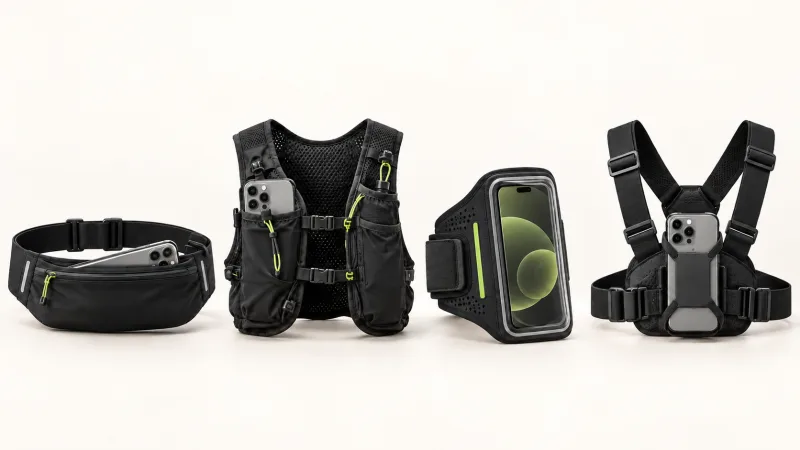
This guide compares every common way to carry a phone while running: running belt, hydration vest, armband, shorts and leggings pockets, handheld, and chest harness. You get one big comparison table, practical buying tips and a dedicated section for runners who want to stream video from their run.
Why where you carry your phone matters
Anything that bounces with every step is a signal your body tries to correct. At a cadence of around 170 steps per minute, a phone in a loose pocket takes more than 10,000 small impacts per hour of running. That is enough to change your stride, tighten a shoulder or rub your hip raw.
Several factors matter at once:
- Distance from your center of mass. The closer to hips and torso, the less the phone swings.
- Symmetry. Weight on one arm or one side can subtly change your arm swing.
- Screen access. Can you check pace or the map without stopping?
- Sweat and rain. Electronics hate moisture, and a touchscreen inside a damp pouch often misbehaves.
- Purpose. Carrying a phone for music is a different job from carrying it as a camera.
Running belt
A stretchy running belt with a tube-style pocket is the most popular choice today, and for good reason. A well-fitted belt sits low on the hips, hugs the body and keeps the phone near your center of mass. A classic fanny pack with one big zip compartment bounces noticeably more than a slim belt with several pockets.
Pros: minimal bounce, room for keys and a gel, arms stay free, works from 5K to the marathon.
Cons: getting the phone out usually means slowing down or stopping, and a belt under a shirt can feel hot in summer. Very large phones may not fit narrow pockets.
Hydration vest
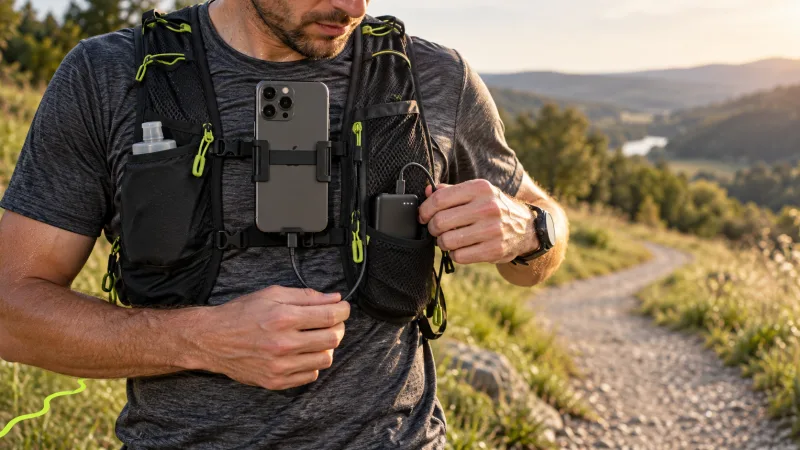
The vest is standard kit for trail and long runs. The phone usually goes into a chest pocket next to the bottles or soft flasks. The load spreads across shoulders and torso, so even a big phone barely registers.
Pros: best comfort when you carry a lot, phone within reach, space for water, a jacket and food. A chest pocket gives quick access to the map.
Cons: overkill for an easy 5K, warm on the back in summer. In a soft pocket the phone can sway if the vest is not cinched down.
Armband
The armband with a clear window was the default for years. It now loses to belts on comfort, but it still makes sense for short runs, especially if you want to glance at the screen without taking the phone out.
Pros: screen visible all the time, nothing around the hips, very light.
Cons: weight on one arm, rotation with large phones, sweat collects under the fabric. Touch through the plastic window is hit and miss, especially when wet.
Shorts and leggings pockets
More and more leggings and shorts have thigh pockets or a pocket in the back waistband. A well-designed thigh pocket in tight leggings can hold a phone surprisingly well. Loose shorts with an inner pocket are a different story: the phone slaps your thigh on every stride.
Pros: nothing extra to buy, no straps or clips.
Cons: stability depends entirely on cut and fabric tension, big phones stick out, and thigh sweat goes straight onto the device.
Handheld
Some runners simply hold the phone, sometimes in a handheld strap. For 3-5 km it is doable, but that arm moves differently from the other one, and a clenched hand tenses your forearm and shoulder.
Pros: instant access, no gear needed.
Cons: asymmetric arm swing, easy to drop, and if you trip, phone and wrist take the hit together. Not great for longer distances.
Chest harness or vest strap mount
A chest harness (straps with a mount on the sternum) or a small clip-on mount on your vest strap is less common among everyday runners, but it is essential for anyone who films. The phone sits on the front of your torso, the part of your body that moves least.
Pros: the steadiest footage, screen visible with a slight tilt of the head, both hands free.
Cons: extra gear, the straps take getting used to, and the phone is exposed to rain and to a fall.
Comparison table: which carry option for what
| Option | Comfort | Bounce | Screen access | Sweat and rain | Works for live camera? | Best for |
|---|---|---|---|---|---|---|
| Slim stretchy running belt | High | Low | Poor (take it out) | Good rain cover, sweat from body | No (lens covered) | 5K to marathon |
| Single-pocket fanny pack | Medium | Medium | Poor | Good, depends on fabric | No | Up to 10K |
| Hydration vest | Very high | Low | Good (chest pocket) | Medium, pockets are usually mesh | Only with a strap mount | Half marathon, ultra, trail |
| Armband | Medium | Medium | Very good | Poor (sweat underneath) | No (footage swings with arm) | Up to 10K |
| Leggings thigh pocket | Medium to high | Low to high (depends on cut) | Poor | Poor (thigh sweat) | No | Up to half marathon |
| Handheld | Low | High | Instant | Poor | Barely (shaky footage) | Up to 5K |
| Chest harness or vest strap mount | Medium to high | Very low | Good | Poor without a cover | Yes, the best choice | Any distance if you film |
Not filming? A belt for everyday runs, a vest for long and trail runs. Filming or streaming? A chest harness or vest strap mount, no exceptions.
Your phone as a camera: setting up for a live stream
Live video from a run asks something completely different of your phone. The lens has to see the road, not the inside of a belt. The picture has to be steady enough that viewers do not feel seasick after a minute.
Position: forward facing, tight, on the torso
The best setup is the phone on your sternum, portrait or landscape, with the lens tilted slightly down so the frame shows the path 5-15 meters ahead and a bit of horizon. The mount must press the phone against your body. Even a millimeter of play turns into a jittery image at every step.
Make sure no strap, jacket hood, race bib or headphone cable covers the lens. It is the most common reason viewers spend half an hour watching black fabric.
Image stability: your stride matters too
The mount is half the job. The other half is how you run.
- A shorter, quicker stride means less vertical bounce in your torso and calmer footage.
- Land softly under your center of mass instead of striking the heel far in front.
- Relax your shoulders. A tense upper body transfers every step to the phone.
- Ease off on descents and rough ground when you are showing viewers something.
Front or back camera?
The back camera shows the route and usually has better image quality. It is the right default for most of the run: viewers see what you see. The front camera is great when you want to talk to viewers, thank them for cheering, or show your tired but happy face at the finish. Switching cameras mid-run is a normal part of a stream, so you do not have to choose once and for all.
The screen has to stay on
Streaming from a mobile browser only works with the screen on. Locking the screen or switching to another app can pause the camera and GPS. That is how mobile operating systems behave, not a quirk of one website. So a mount that leaves the screen exposed and away from your skin beats a pocket where the screen can register accidental taps.
An active screen plus the camera also drains the battery fast. Read our guide on making your phone battery last on long runs before you head out for more than an hour.
Rain and sweat
A phone in a chest mount is exposed. For wet days, use a waterproof case with a clear lens window, or a thin zip bag as an emergency cover. Test before the run that the material does not blur the image and that water droplets do not sit right on the lens. A sealed case makes the microphone quieter and muffled, but video still works.
For the full step-by-step setup, see the guide on how to live stream your run from your phone. If you also ride, our article on live streaming your bike ride covers handlebar mounts.
What to check before you buy
Before buying a belt, armband or mount, check a few things the product photo will not show you.
- Phone size including the case. Manufacturers list a maximum screen size or dimensions. Add the case thickness, it is the usual reason a phone does not fit.
- Waist or chest size. The belt must be snug without squeezing your stomach on a deep breath.
- The bounce test. Put it on with your phone inside and do 20 jumps on the spot. If you feel the phone shift, it will be worse on the run.
- Fabric against your skin. Seams and Velcro can chafe after an hour. Look for smooth finishes.
- Reflective details. In autumn and winter many runs happen in the dark. Reflective trim on a belt or harness is a cheap, real visibility boost.
- Closure. Buckle, Velcro or zip must work with cold fingers or gloves.
- Washing. Anything touching your body will get sweaty. Check it can go in the washing machine.
Phone, safety and running alone
For many runners the phone is mainly peace of mind. You can call for help, and the people close to you can see where you are. So carry it where you can reach it quickly, even if you never look at the screen on a normal run.
We cover this in more depth in our guide to staying safe when running alone. Remember: a tracking app does not replace the emergency number. In an emergency, call 911 in the US or 112 in Europe.
Quick pick
- 5-10 km with music: a slim running belt or a good leggings pocket.
- Long runs and marathon: a multi-pocket belt or a light vest.
- Trail and mountains: a vest with a chest pocket.
- You want the screen visible all the time: an armband (shorter runs) or a vest chest pocket.
- You film or stream your run: a chest harness or vest strap mount, lens forward, screen on.
Want the people you care about to watch your next run live? Create a free account and do a short test run with your mount well before an important race.
Frequently asked questions
What is the best way to carry a phone while running?
For most runners a snug, stretchy running belt worn low on the hips is the best all-rounder, because it keeps the phone close to your center of mass and barely bounces. For long runs and trail, a hydration vest with a chest pocket is more comfortable. Armbands suit short runs, and a chest harness is the best option if the phone needs to film or live stream.
Are phone armbands good for running?
They work for 5-10 km if the armband fits both your phone and your arm. Large phones over about 200 g tend to rotate and load one arm, which some runners notice within a few kilometers. Sweat also builds up underneath, so wash the armband often and check that the touchscreen still responds through the window.
How do I mount my phone to film my run?
Use a chest harness or a small mount on your vest strap, with the lens facing forward and slightly down. The phone must sit tight against your body and nothing should cover the lens. Armbands and hip belts are poor camera mounts because the footage shows your arm or leg swinging instead of the route ahead.
How do I stop my phone from bouncing when I run?
Carry it as close to your center of mass as possible (hips or sternum), choose a belt or vest in the right size rather than a loose one, and tighten it until the phone does not move when you jump on the spot. A lighter case and not sharing the pocket with keys also help.
Let your people follow your route live
Video, GPS map and pace in one link. Viewers need no app and no account.