How-to 7 min read
How to Live Stream Your Bike Ride: Road, Gravel and MTB with a Live Map
Phone mounts, wind noise, a battery that lasts five hours, data usage and patchy rural signal: a practical guide to live streaming road, gravel and MTB rides with a live map.
Published by BEON.RUN ·
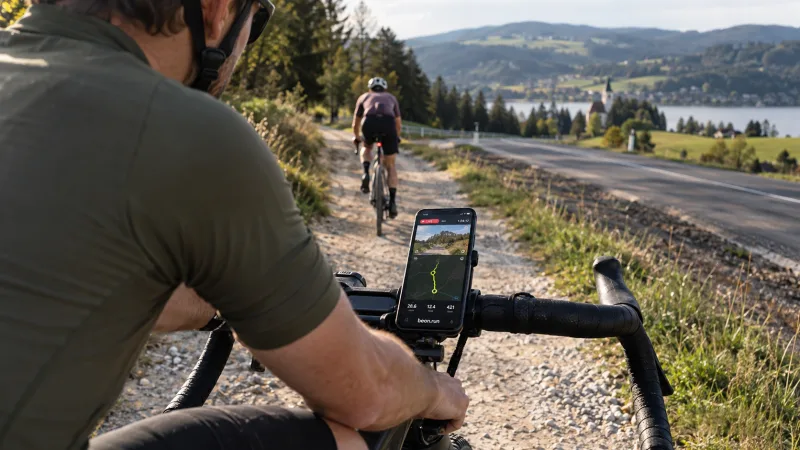
A solo century, a gravel loop through the backcountry, a day at the bike park: cycling is the sport where the people at home usually have no idea where you are for hours. A live stream with a map fixes that with one link. Family sees you are moving, club mates watch the big climb, and you stop sending "still alive" texts from every gas station.
But a bike is a harder place to stream from than a run. Vibration, wind at 20+ mph, three to six hours in the saddle and dead zones on rural roads. This guide shows how to handle each of those, with separate notes for road, gravel and MTB.
Why live stream a ride at all
The most common reason is peace of mind for whoever stayed home. Long solo rides start at dawn and finish after dark. A live map link replaces the hourly "where are you?" phone call.
The second reason is sharing the adventure. A gravel day on remote forest roads looks far better as live video than as a bike computer screenshot afterward. Friends can drop messages into the chat and you hear them in your earbud.
The third is club rides and bikepacking. A group can show the route to people who could not make it this week, and on a multi-day trip your family can see where each day ends.
Phone mount: stem or chest
This is the decision that matters most. It decides whether the video is watchable and whether your phone survives the ride.
| Mount | Pros | Cons | Best for |
|---|---|---|---|
| Stem / out-front | Steady road view, easy to start before rolling, easy to cable to a top tube bag | Transfers road buzz, phone exposed in a crash | Road, smooth gravel |
| Mount with vibration dampener | Less shaky video, less stress on the camera's optical stabilization | Bulkier, sits higher | Gravel, washboard, cobbles |
| Chest harness | Body absorbs shocks, shows hands and bars, phone safer in a crash | Points at the tarmac when you are low on a road bike, harder to cable | MTB, technical gravel |
| Back / helmet | Unusual angle | Poor stability, hard to secure, more risk | Not recommended |
A few rules whatever you choose:
- Tighten the mount and use a tether. A phone ejected on a 30 mph descent ends the stream and probably the phone.
- Angle the camera slightly down. Viewers want the road ahead, not the sky. On the road, put the horizon in the upper third of the frame.
- Protect optical stabilization. Some phone makers warn that strong, sustained vibration (for example from motorcycle engines) can damage camera stabilization modules. A dampener is cheap insurance on rough surfaces.
- Use the rear camera. You can switch front and back cameras, but set it before you leave.
Wind noise and the microphone
At 15-25 mph the wind turns a phone microphone into a roaring mess that tires viewers faster than lower video quality. You have three options.
- Mute the microphone. Simplest and usually best. Viewers watch the picture, map and numbers, and talk to you through chat.
- Stream video without the microphone. If you do not grant microphone access, video still works.
- Shield the mic. A bit of foam or a small furry windscreen over the mic opening helps at lower speeds, on climbs and in the woods.
Chat messages can be read aloud in your earbud. Use one earbud or bone conduction headphones so you still hear traffic.
Speed, not pace: set the right activity type
Runners think in min/km or min/mile. Cyclists do not. Pick the right activity type: road cycling, gravel or MTB. Viewers then see speed instead of pace.
Before you leave, also check:
- Visibility: public, unlisted (link only) or private. Activities are private by default.
- Privacy trim: hide the first and last 200, 500 or 1000 m of the route. If you start from home, use it. In the countryside, where houses are far apart, pick 1000 m.
- Plan: FREE allows streams up to 30 minutes. Long rides need a higher plan, see pricing.
Route with GPX and an off-route alert
Long rides on unfamiliar gravel are the perfect case for a planned route. Import a GPX file or save an earlier activity as a route. During the ride you see it on the map and get an alert when you go off course.
Viewers see the planned route too. That is great for bikepacking: family knows where you plan to camp and how far is left. More in the routes and GPX feature.
Battery for 3-6 hours
Camera, GPS, screen and upload at once are among the heaviest loads a phone can run. In a mobile browser the screen must stay on (BEON.RUN keeps it awake), and locking the phone or switching apps can pause camera and GPS. On a bike, plan your power.
- Power bank in a top tube bag with a short right-angle cable to the phone on the stem. Simplest and most reliable.
- Hub dynamo with a USB charger. The bikepacking classic. Great at steady speed, weaker on climbs and stops, so keep a small power bank as a buffer.
- Low screen brightness and dark mode where possible.
- Video where it counts. On very long days, consider shorter camera streams on the scenic sections and let people follow the rest on the map.
Heat drains batteries too: a phone on the stem in full sun warms up and may throttle itself. More tricks in our guide to phone battery on long live sessions.
Mobile data on a long ride
BEON.RUN video is up to 720p, with the bitrate capped at about 1.5 Mbit/s and dropping automatically on a weak network. That means at most roughly 0.7 GB of upload per hour, often less.
| Ride time with camera | Maximum usage (approx.) |
|---|---|
| 1 hour | up to 0.7 GB |
| 3 hours | up to 2.1 GB |
| 4 hours | up to 2.8 GB |
| 6 hours | up to 4.2 GB |
A GPS-only map is a fraction of that. Full numbers in how much mobile data a live stream uses.
Signal on rural roads
Between small towns, in valleys and deep forest, LTE can vanish for minutes. That is normal and should not end your stream. Video reconnects automatically after short drops, and GPS points recorded offline are buffered on the phone and sent when the connection returns, so the route on the map has no gap.
Tell your people in advance: "if the video freezes for a few minutes, it is probably the woods, not a crash." It saves stress on both ends. Check your carrier's coverage map for the planned route before you go.
Road, gravel and MTB: what changes
Road
The easiest case for video. Smooth tarmac, a fixed angle, a stem or out-front mount. The main challenges are wind noise and ride length. On group rides, do not film other riders' faces up close without asking.
On long climbs viewers love seeing the gradient, so tilt the camera up slightly before the road kicks up.
Gravel
Vibration control is everything. Washboard, loose rock and roots can turn video into jelly. A dampened mount or a chest harness makes a big difference. Gravel also means long days and bikepacking, so power and GPX matter most here.
MTB
On singletrack the chest mount wins: you see hands, bars and the line. The phone is also safer in a crash. Signal in forests and valleys is often weak, so expect gaps. On descents, focus only on riding.
If you ride in the mountains, also read our guide to live tracking trail and mountain outings: signal, GPX and safety work much the same way.
Club and group rides
On a group ride you can show the route from several angles. On the PLATINUM plan, group training supports up to 4 people, each with their own GPS and stream. Viewers get one shared map and switch between perspectives.
Agree beforehand who streams and where they ride in the group. A view from the front and one from the back tell very different stories.
Pre-ride checklist
- Phone charged, power bank in the top tube bag, right-angle cable connected
- Mount tightened, phone tethered
- Rear camera, angled slightly down
- Microphone muted or shielded
- Activity type: road, gravel or MTB (speed instead of pace)
- GPX route loaded, off-route alert on
- Privacy trim set
- Visibility set, link sent
- Your people warned about possible signal gaps
- Stream started before you roll
Safety first
The stream is an extra, the ride comes first. Do not touch the phone while moving, do not read chat on the screen, and follow the traffic laws where you ride. If something needs fixing, stop off the road.
BEON.RUN shows where you are, but it is not an emergency service. In an emergency, call 112 in Europe or 911 in the US. Ready to try it? Create a free account and do a short test ride around the block before your all-day route.
Frequently asked questions
Can I live stream a bike ride from my phone without an action camera?
Yes. A phone on a solid stem or chest mount and a browser are enough. In BEON.RUN you start a cycling activity, optionally turn on the camera, and your people get one link with video, a live map, distance, time and speed. They watch in any browser, without an account and without installing an app.
How much data does a 4-hour live stream from a bike use?
BEON.RUN caps the video bitrate at about 1.5 Mbit/s, which works out to at most roughly 0.7 GB of upload per hour, often less on a weaker network. Four hours with the camera on is therefore up to about 2.8 GB. A GPS-only live map uses a small fraction of that.
What is the best way to mount a phone on a bike for filming?
On the road, a rigid stem or out-front mount angled slightly down at the road works best. On gravel and MTB, a mount with a vibration dampener or a chest harness helps, because your body absorbs the shocks. Always tighten the mount fully and use a tether so the phone cannot fly off.
Is it legal to use a phone while cycling?
Rules differ by country and state, but the safety rule is simple: do not handle your phone while riding. Start the stream before you roll, and if anything needs changing, stop somewhere safe first. A mounted phone should run on its own while you watch the road.
How long will my phone battery last when streaming a ride?
Camera, GPS and upload together are one of the heaviest loads a phone can run. For a multi-hour ride, plan power: a power bank in a top tube bag with a short cable, or a USB charger fed by a hub dynamo. Low screen brightness and camera only on the best sections help too.
Let your people follow your route live
Video, GPS map and pace in one link. Viewers need no app and no account.