Gear 10 min read
Phone Battery on Long Runs: How to Last to the Finish With GPS and Video
What drains your phone on a long run or ride with GPS and a live stream, which settings actually help, and how to test your setup before race day.
Published by BEON.RUN ·
The most common post-race story from runners who share their run live is not about pace or hitting the wall. It goes like this: "my phone died at km 30." The family was watching the map, the dot froze, and nobody knew whether something had happened or the battery had simply run out.
The good news is that this can be planned. Battery life is not a lottery, it is an energy budget. This guide breaks that budget down: what eats it, what to realistically expect with GPS only versus a camera, which iPhone and Android settings actually help, and how to pick a power bank and test the whole setup before race day.
What actually drains your battery on a run
On the course your phone does several things at once. Each one costs a different amount, so it helps to know what you are fighting.
- The screen. For a browser-based live stream it has to stay on the whole time. Brightness matters a lot, especially in sunshine when auto-brightness pushes it to the maximum.
- The camera and video encoding. Usually the biggest single drain. The phone captures video, compresses it in real time and uploads it. It also heats up.
- Uploading over mobile data. The modem works continuously, and the more you send, the longer it stays active.
- Weak signal. With poor coverage the phone raises its transmit power and keeps searching for a better cell. In forests, mountains and valleys that can cost more than GPS itself.
- GPS. The satellite receiver uses less than most people assume, but it runs for the entire activity.
- Cold. A cold battery delivers less energy and can shut the phone down at a reported 15 or 20%.
- An aged battery. A three-year-old phone with hundreds of charge cycles simply has a smaller tank than on day one.
The takeaway: camera, screen and weak signal are the three big levers. GPS matters, but it is rarely the main culprit.
Realistic expectations: GPS versus camera
I will not give you a single number like "you will get 5 hours", because it would be false. The result depends on the model, battery health, temperature, coverage and screen brightness. Differences between phones are several-fold, not a few percent.
What can be described honestly are the proportions:
- GPS only with a dimmed screen is the frugal scenario. A good phone with a healthy battery usually gets through a marathon, often with plenty to spare.
- Camera for key moments only (the start, scenic sections, the last mile) is a sensible compromise. Drain jumps while video is being sent and drops back without it.
- Camera all the time is the most expensive scenario. Many phones run flat within a few hours, and an older one may not last a marathon without extra power.
So rule number one is: test it on a training run. One hour with exactly the same setup tells you more than any article, this one included.
Scenarios: what to expect and what to carry
| Scenario | Biggest drain | What to expect | What to carry |
|---|---|---|---|
| GPS only, dimmed screen | screen, GPS, modem | usually enough for a half or full marathon on a healthy battery | full charge; for an ultra a small 5,000 mAh pack |
| Camera for key moments | camera and video upload while live | depends on how many minutes you broadcast; a marathon usually needs a reserve | 5,000-10,000 mAh pack and a short cable |
| Camera all the time | camera, encoding, modem, heat | a few hours; on an older phone less than a marathon | 10,000 mAh pack, cable, a plan to charge on the move |
| Any scenario in winter | cold reduces available capacity | the phone may shut down at 15-20% | phone and power bank close to your body |
| Any scenario in mountains or forest | searching for signal | faster drain than on the same distance in a city | a bigger reserve than on the road |
If you stream video, watch your data plan too. I worked out what an hour of video really uses in how much mobile data a live stream from a run uses.
iPhone settings before a long run
These steps take five minutes and make a real difference.
- Check battery health: Settings > Battery > Battery Health & Charging. If maximum capacity is clearly lower than it used to be, expect less runtime and carry a power bank.
- Charge to 100%. Newer iPhones offer an 80% charge limit and optimized charging. On race morning make sure the phone is genuinely full.
- Lower the brightness to the lowest level you can still read. In full sun auto-brightness climbs, so consider turning it off for the run if you rarely look at the phone.
- Prefer LTE when 5G is weak: Settings > Cellular > Cellular Data Options > Voice & Data > LTE. Where 5G barely works, the phone wastes energy switching between networks.
- Turn off Wi-Fi so the phone does not scan for networks along the way. Keep Bluetooth on if you use headphones or a watch.
- Limit background apps: disable Background App Refresh and location access for apps you do not need. Swiping apps closed in the app switcher does very little.
- Turn on a Focus mode so notifications do not cover the screen or wake the modem for nothing.
A note on Low Power Mode: it limits background activity, which helps, but it also shortens Auto-Lock. With a browser-based stream, check on a training run that the screen really stays on the whole time.
Android settings before a long run
Menus vary between manufacturers, so the names may differ slightly.
- Battery health: some phones show it under Settings > Battery (for example recent Pixel and Samsung models), on others the manufacturer's diagnostics app helps.
- Disable the charge limit (such as "Protect battery" or charging to 80-85%) before race day so you start at a full 100%.
- Unrestricted browser: in App info > Battery set your browser to "Unrestricted". Aggressive optimization can throttle the page.
- Prefer LTE when 5G is weak: Settings > Network > SIM > Preferred network type.
- Turn off Wi-Fi and Wi-Fi/Bluetooth scanning in location settings if you do not need them.
- Avoid ultra or extreme power saving, which leaves only a handful of apps running. Test the regular battery saver in advance.
- Dark mode on phones with an OLED screen gives a small but real gain.
One tracking app, not three
A common mistake: Strava, a watch companion app and a live stream all recording the same run. Each uses GPS and CPU. If your watch records the run, the phone can focus on the stream.
The screen must stay on: what that means in practice
A live stream from a mobile browser has one limitation you should know up front: the screen must stay on. Lock it or switch to another app and the system may pause the camera and GPS. That is how mobile browsers work, not a bug.
BEON.RUN handles this for you: it uses the Screen Wake Lock, a browser mechanism that keeps the display from turning off during an activity. Your job is just to keep the brightness low and not switch apps mid-run.
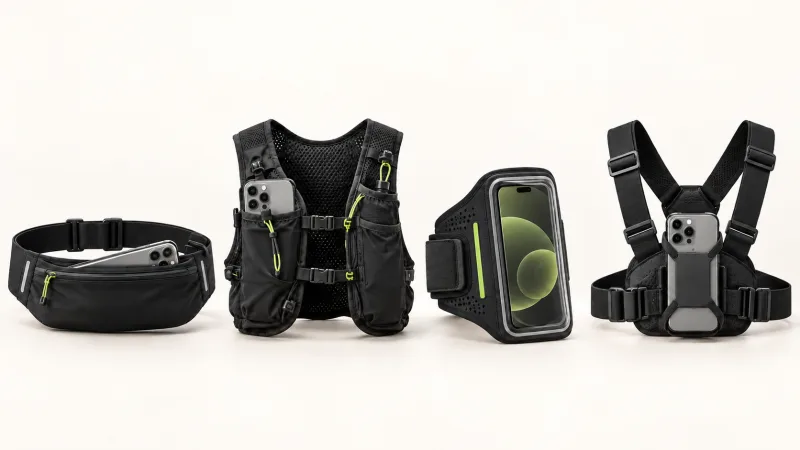
An active screen in a pocket can also touch fabric. A pocket where the screen faces your body, not the zipper, helps. For mounts and pockets see how to carry your phone while running.
Cold, heat and old batteries
Cold
Phone makers typically list an operating range of about 0 to 35°C (32 to 95°F). Below freezing a battery loses part of its available capacity and copes badly with load spikes, and video streaming is exactly that kind of load. The result: the phone shows 15%, then suddenly switches off.
What helps: carry the phone under your jacket or in an inside vest pocket, not in an exposed armband. Keep the power bank warm too. Capacity comes back when the phone warms up. More on winter running in running in the dark and in winter.
Heat
Camera, encoding and sun on the screen can overheat a phone. The system then dims the display, throttles performance and in extreme cases stops the camera. Do not leave the phone in direct sun on your handlebars without shade, and do not charge it on the move when it is already very hot.
Old battery
A battery with several hundred cycles has clearly less capacity. If your phone barely survives a normal day, do not assume it will manage four hours of video. A power bank costs less than the stress on course.
Choosing a power bank for running and cycling
mAh versus Wh
The mAh figure on the label refers to cells at about 3.7 V. Energy is better described in Wh: Wh = mAh × V / 1000, so 10,000 mAh is about 37 Wh. Some energy is lost to voltage conversion and heat, so the phone receives noticeably less than the label suggests.
In practice: a 10,000 mAh pack charges a typical phone roughly one and a half to two times, and a 5,000 mAh pack gives about one partial charge. That is enough to get from 15% back to a safe level.
Weight and shape
- 5,000 mAh: light, usually well under 150 g, fits a vest or belt pocket. Good for a marathon or an ultra with GPS only.
- 10,000 mAh: heavier, often around 200 g. Worth it for many hours of video, trail races or long rides.
- A flat shape sits better in a back pocket or frame bag than a thick brick.
Cable and carrying
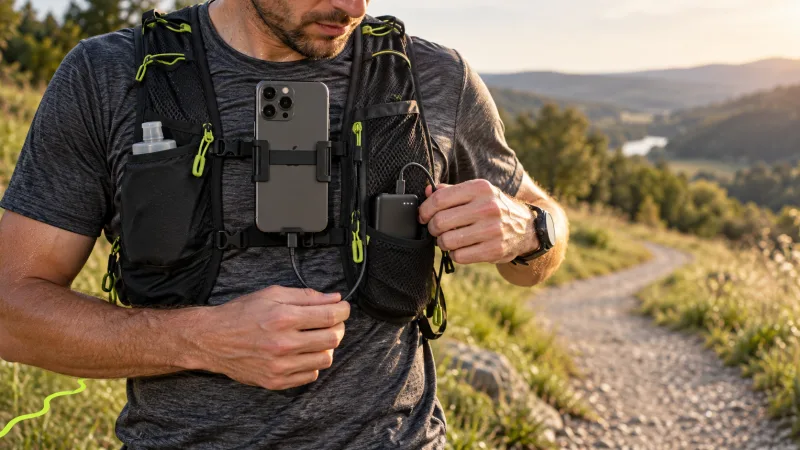
Bring a short cable (20-30 cm, under a foot), ideally with an angled plug that does not snap in a pocket. Long cables tangle and catch your arm. The most comfortable option is a running vest with the cable routed to the phone pocket. On a bike, a top tube bag works well.
Charge before it is critical, for example at 30-40%, not at 5%. A cooler phone with some reserve handles charging under load better.
A test protocol before race day
Do this one or two weeks before the race, not the night before.
- Charge the phone to 100% and set everything up as on race day: brightness, network, apps, mount.
- Start an activity in the scenario you plan to use (GPS only, camera at key moments, or camera all the time).
- Run or ride for at least 60-90 minutes. Note the battery percentage every 30 minutes.
- Work out the drain per hour and multiply by your expected finish time.
- Add a margin: race day can be colder or hotter, thousands of phones in one place load the network, and you wait at the start with the phone on.
- If the result gets close to zero, carry a power bank and practice plugging it in on the move, with gloves if it will be cold.
- For trail races, check the route against your carrier's coverage map and expect more drain in valleys. More in trail and mountain runs with a live link.
Race morning checklist
- Phone charged to 100% (charge limit off)
- Power bank charged, cable in the pocket next to it
- Brightness down, Wi-Fi off, LTE if 5G is weak
- Only one app tracking the run
- Notifications silenced
- Phone close to your body, especially in winter
- A plan for when the camera goes on and when the map is enough
- Your people have the link and know that a gap in video does not have to mean a problem
That last point matters more than it seems. If your supporters know video may disappear for a few minutes in a weak-signal area and the map will catch up, nobody panics.
Summary
Your phone does not have to die at km 30. The biggest savings come from less time with the camera on, low brightness, LTE instead of weak 5G, a warm battery in winter and one tracking app instead of three. A light power bank and one honest training test cover the rest.
Want to check your setup on your next long run? Create a free account, start an activity and see how much battery is left after an hour. The BEON.RUN live streaming feature page explains what your viewers will see.
Frequently asked questions
How long will my phone battery last during a marathon with GPS?
GPS only with a dimmed screen is usually enough for a marathon on a good phone with a healthy battery. Streaming video for the whole race is a different story: many phones run flat within a few hours, older ones sooner. The only reliable answer is a training run with the exact same setup and settings.
Does Low Power Mode help when running with GPS?
Partly. It limits background activity and refresh, which helps, but on some phones it also shortens the auto-lock time or restricts background work. A browser-based live stream needs the screen to stay on, so test on a training run that nothing shuts off while the saver is active.
What size power bank should I carry for running?
For a marathon or ultra with GPS, a light 5,000 mAh pack is usually enough. For many hours of live video, 10,000 mAh is the safer choice. Weight, a flat shape that fits a vest pocket and a short cable matter too. The phone receives noticeably less energy than the mAh label suggests.
Why does my phone die faster in the cold?
Lithium-ion batteries deliver less energy at low temperatures, and under heavy load the voltage sags. The phone may shut down even though it still showed 15% or more. Keep it close to your body under a layer, and keep the power bank warm too.
Let your people follow your route live
Video, GPS map and pace in one link. Viewers need no app and no account.