
Comparisons
Strava Beacon vs Garmin LiveTrack vs BEON.RUN
An honest comparison: what Strava Beacon, Garmin LiveTrack and BEON.RUN show, what a viewer needs and when each tool makes sense.
Published by BEON.RUN · Published
Strava Beacon, Garmin LiveTrack and BEON.RUN all answer a similar question: “where is my person right now?” They do it differently, though, and each fits a different situation. This comparison is based on the makers’ public documentation. Other services change their features and terms, so check their current help pages before you decide.
At a glance
| Strava Beacon | Garmin LiveTrack | BEON.RUN | |
|---|---|---|---|
| What it shares | Live position, start point, route so far, activity time and the phone’s battery level | Position, time, distance, speed and elevation; sensor data (e.g. heart rate) depending on the device | Camera video, position and route, time, distance and pace or speed, plus chat |
| Sent from | A recording in the Strava app | A compatible Garmin device paired with the Garmin Connect app | A phone browser (Safari, Chrome) |
| What a viewer needs | The link and a browser - no account | The link from the invitation (email, social, messenger) | The link and a browser - no account, no app |
| Live video | No | No | Yes |
Strava Beacon
Beacon works while you record an activity in the Strava app. It creates a link you can text to up to three safety contacts or share yourself. According to Strava’s documentation the position updates roughly every 15 seconds depending on coverage, and the recipient needs no account or app. When the activity ends, contacts no longer see your current location. It is first and foremost a safety tool.
Garmin LiveTrack
LiveTrack needs a compatible Garmin device connected to the Garmin Connect app on your phone. Invited viewers get a link to a page with your position plus time, distance, speed and elevation - and, with the right sensors, data such as heart rate. It suits people who already train with a Garmin watch and want to share training data.
BEON.RUN
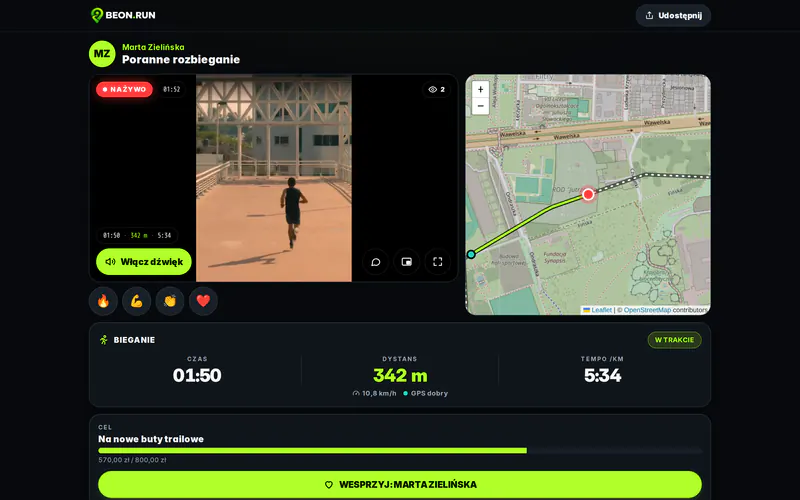
BEON.RUN is built around live video: next to the map and stats, viewers watch your phone’s camera and can chat. It runs in the phone browser with no extra hardware, and viewers open everything from one link. If you don’t want video, you can share just the map and stats.
Which one when
- You want someone to know where you are and you use Strava - Beacon is simple and safety-focused.
- You train with a Garmin watch and want to show training data - LiveTrack uses what’s already on your wrist.
- You want your people to see your run, not just a dot on a map - BEON.RUN combines video, map, stats and chat.
They don’t rule each other out. You can record the workout on your watch and stream from your phone at the same time.
Sources: Strava (Beacon) and Garmin (LiveTrack) help pages, as of October 2026. Check the makers for current prices and feature availability.
Try it yourself - your first stream takes a few minutes.
Start for free